//architecture & operations deep dive
Five-Node Proxmox Infrastructure
Five used office machines turned into a platform that routes, resolves, proxies and backs up the network it sits on — built deliberately as standalone nodes rather than a cluster, and documented decision by decision, including the ones that were rejected.
01Context & constraints
Five second-hand Dell OptiPlex small-form-factor machines, bought for roughly $260 CAD in total, running Proxmox VE. The goal was to learn infrastructure by operating it rather than reading about it — on hardware where a mistake costs an evening instead of an invoice.
What turned it from a pile of machines into a design problem was a specific failure. The house router's firmware had no field for handing out a DNS server, so every device on the network silently resolved through the ISP instead of the lab's own filtering resolver. It had been that way for weeks before anyone noticed, because the fallback worked. Fixing that properly is what eventually justified the lab running its own router.
Constraints that shaped the design
- It lives in a bedroom. Five machines running continuously is about 150 W — a small space heater that never switches off, plus five fans and three spinning disks. Nodes have to be able to sleep and wake on demand.
- No ethernet in the room. The router is on a different floor, the lab can't move, and — as it turned out — neither can the router.
- Unknown hardware provenance. Five machines from a reseller, sold as wiped, with no service history and disks of unknown age.
- The household can't be collateral. Anything that breaks in the lab must not take the family's internet down with it.
02Inside the lab
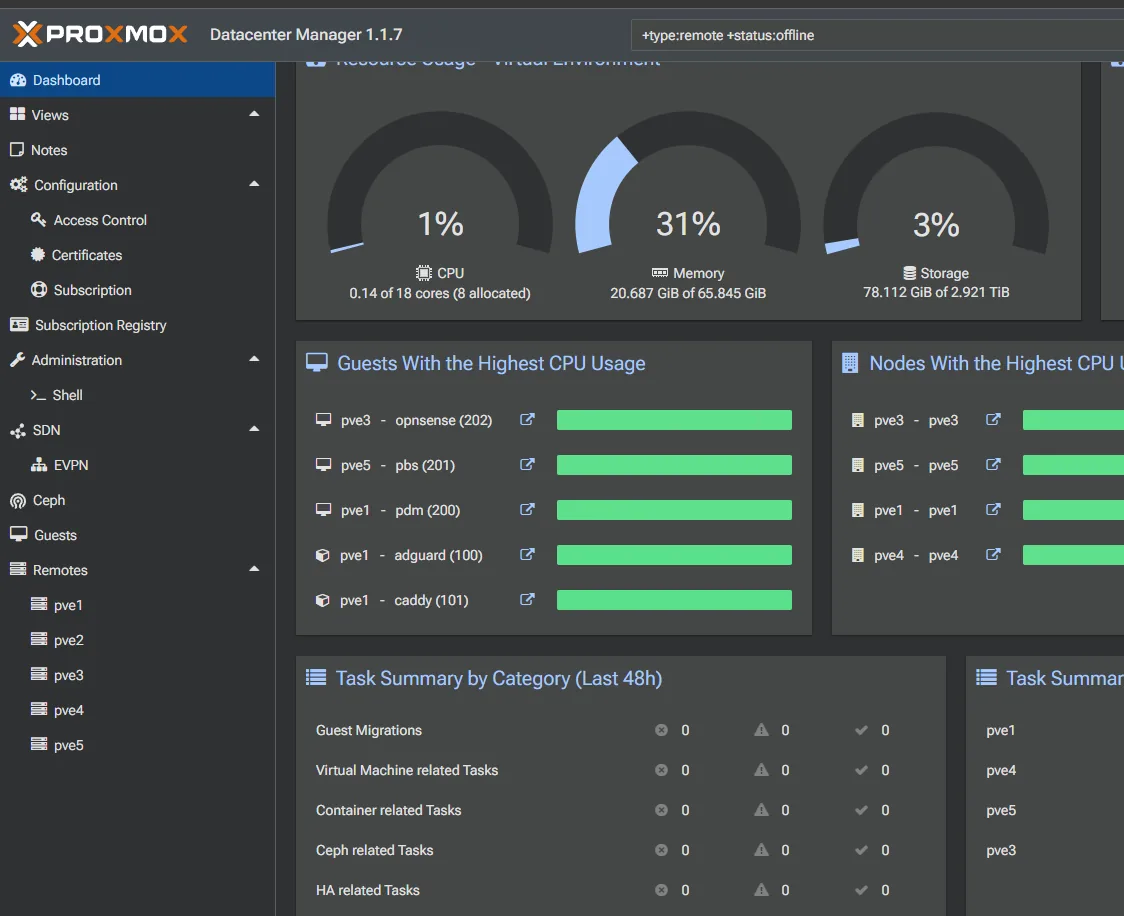
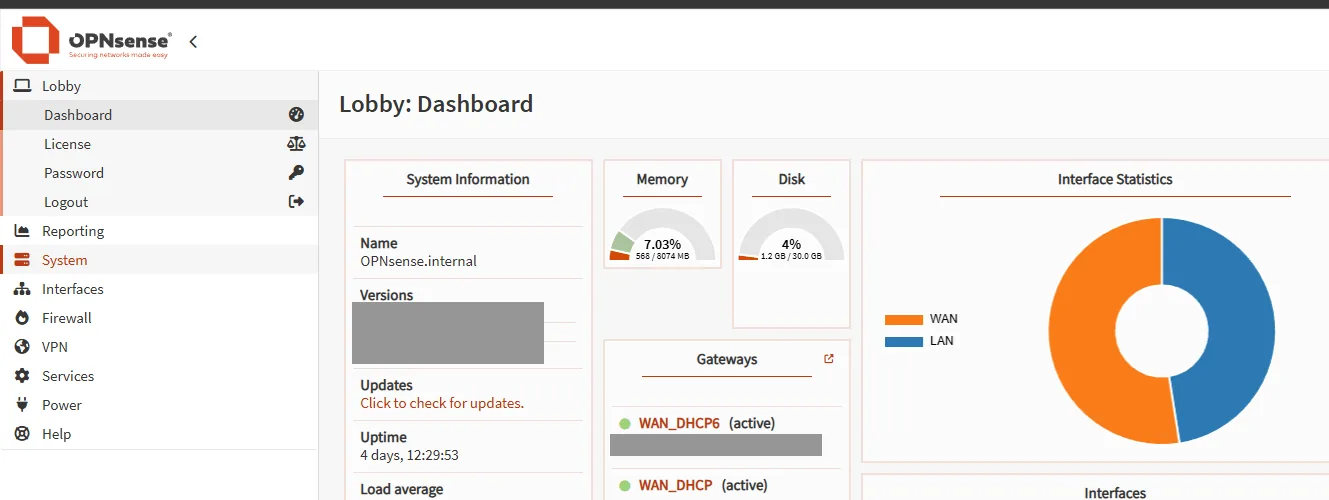
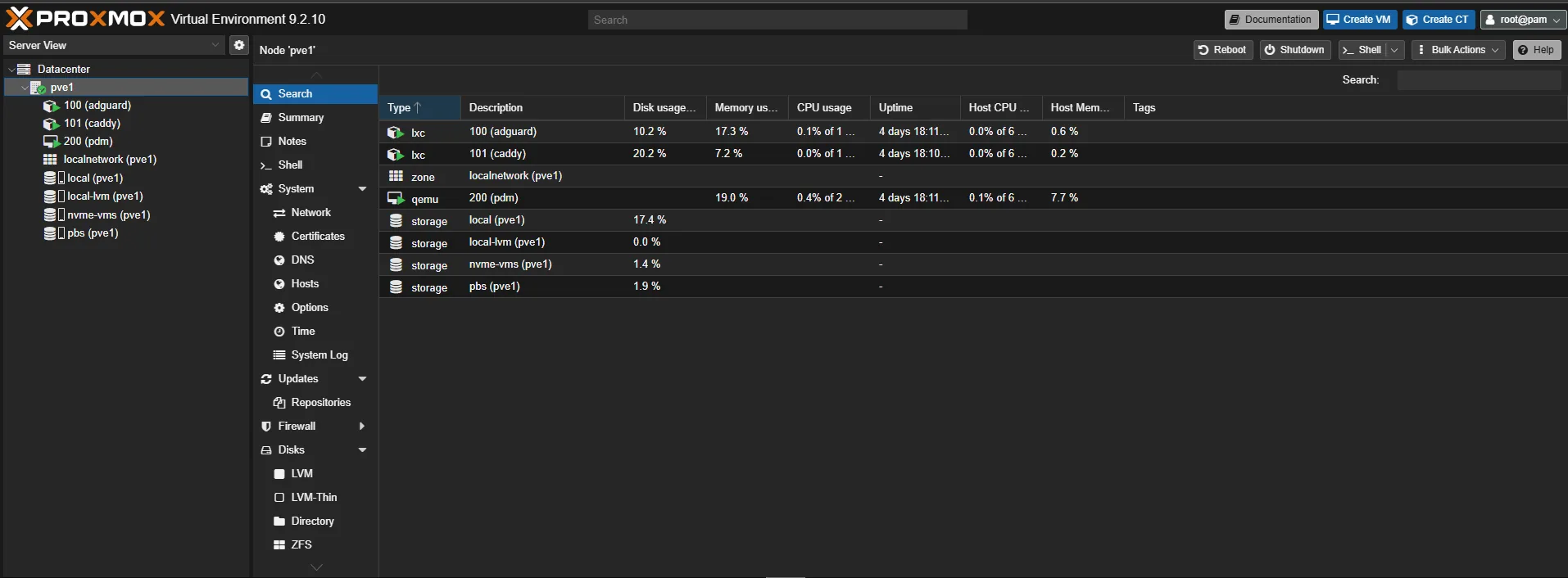
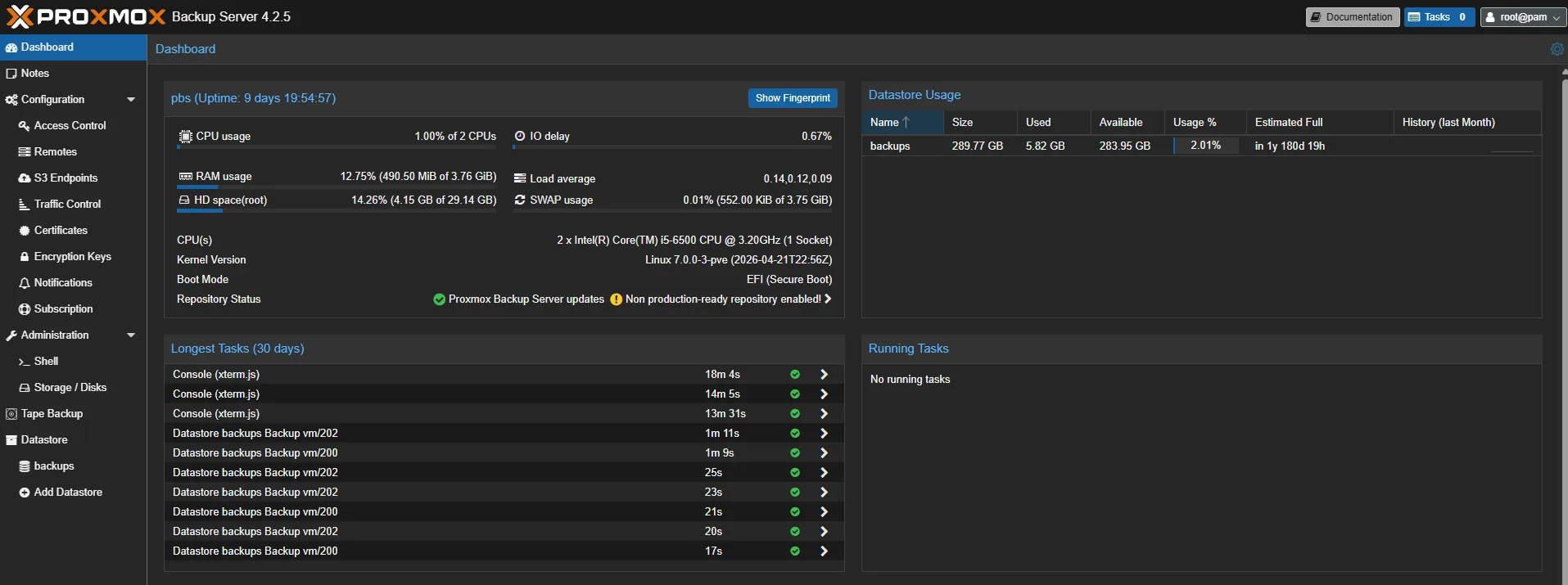
The running system — the aggregated node view, the router the lab built for itself, a node's guest and storage layout, the backup datastore, and the resolver carrying real traffic.
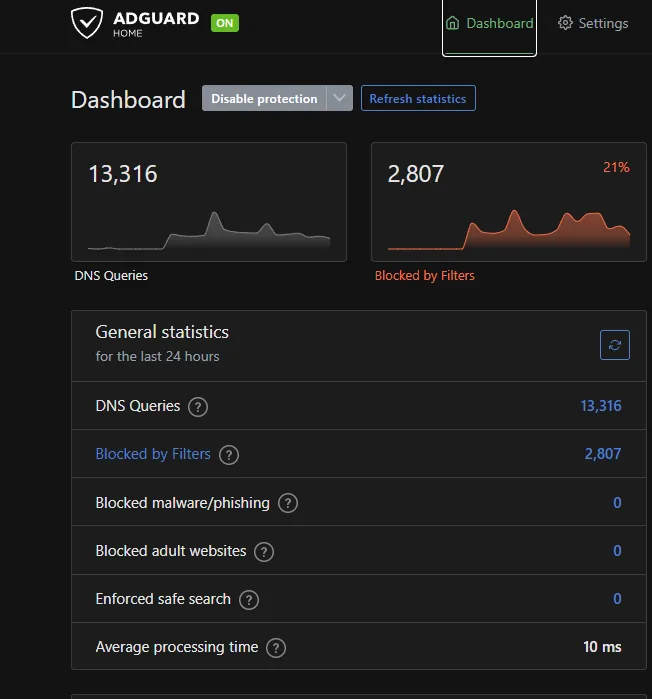
// redacted regions are masked, not blurred — the underlying pixels are destroyed.
03Getting on the network
The single longest-running blocker in the build, and none of it was technical. The interesting part is not the answer — it's the four options that had to be eliminated to arrive at it.
Two RJ45 “splitters” were bought alongside the cable. They are not switches — they're passive adapters that split eight wires into two four-wire pairs, so both links cap at 100 Mbps, because gigabit needs all four pairs. They also only work as a matched pair, one at each end of a single run.
A first attempt used a 75 ft cable that reached — stretched across the floor, untucked. Routed properly along baseboards and around door frames, real length runs 20–30% over the direct path. An RJ45 coupler to join two shorter cables was considered and rejected: it works, but it adds a connection point that can work loose and produce intermittent link failures, which is the kind of fault that gets misdiagnosed as software for hours. A single run was worth the $36.
04Node roles, not a cluster
Clustering gives a single web UI but requires quorum: enough nodes online at all times, or the survivors go read-only. For a lab where machines are deliberately powered down, that is the wrong trade — and removing a node from a cluster later is painful.
Proxmox Datacenter Manager solves the actual problem — one dashboard across independent nodes — without the constraint. It manages remotes purely over the API, covering monitoring, start/stop, migration and snapshots, while deep per-node configuration stays in that node's own interface.
Roles follow the binding resource
Faster CPU + NVMe
Takes the latency- and disk-sensitive services: the resolver, the reverse proxy and the manager VM. Its hypervisor boots from a separate SSD, so it can be reinstalled without touching guests and boot I/O never contends with VM I/O.
Most RAM, slower disk
Takes the memory-hungry, disk-tolerant workloads — and doubles as the node that can be broken freely, because nothing depends on it.
Least RAM → backups
Counter-intuitive, and deliberate. Backup Server is the workload least sensitive to RAM: roughly 2 GB for the service plus about 1 GB per TB of datastore. 16 GB is four times what it needs.
Mechanical disks → targets
Sequential writes are the one workload spinning disks are genuinely fine at. Two HDD nodes means one holds the datastore and the other takes a periodic sync — two copies on two independent machines.
The “Backup Server needs lots of RAM” folklore comes from ZFS: its ARC will happily consume 8 GB or more. On a single disk with no redundancy, ZFS buys nothing here, so the datastore runs on ext4 and the RAM estimate holds. The consequence was worth naming: that node stops being expendable, because it has to be up when scheduled jobs fire — so the scratch role moved elsewhere.
Memory is distributed unevenly across the nodes and the arithmetic to even it out works. It was left alone. Nothing in the plan is memory-constrained except the node that already has the most, so moving capacity to a node running a firewall and a container optimises nothing. A rebalance backed by evidence is worth doing; one backed by tidiness is not.
05Taking over the network
The lab now runs its own gateway. An OPNsense VM holds the LAN gateway address and serves DHCP pointing every client at the lab's resolver — the field the house router's firmware never had, and the reason the whole exercise was worth doing.
A router VM needs two interfaces
A NIC audit across all five nodes turned up an Intel I210-T1 server adapter sitting unused in one machine's PCIe slot, never cabled since the day it arrived. Transplanted into the node that would host the router, it gave the VM two physically separate interfaces at zero cost — WAN on the add-in card, LAN on the onboard NIC.
The move was confirmed at the hardware level rather than assumed: the card enumerated under lspci -nnk with the igb driver bound, initialised cleanly in dmesg, and its MAC address travelled with it — the same address that had been the donor node's unused second interface appeared as the recipient's new one. IOMMU groups were checked at the same time, so PCIe passthrough stays available as an option later.
The cutover, and the address that didn't move
The cutover was built last, not first. The second NIC, the bridge, the VM, its firmware and the interface assignment were all in place and verified before anything touched the address the lab was reached on — so the one step that could sever remote access was taken with a lifeline running and a rollback snapshot already taken. Doing it first would have meant configuring a router through the network it was breaking.
One detail that looks arbitrary and isn't: the new WAN subnet deliberately avoids OPNsense's own factory-default LAN range. “Reset to factory defaults” is one keystroke away on the console menu, and a reset that lands the firewall on the same subnet as the upstream router turns a recoverable mistake into a confusing one.
Household Wi-Fi was left on the WAN side throughout, unaffected by anything happening in the lab. That was the original objection to running a homemade router at all, and it was resolved by topology rather than by not building it.
06Names & certificates
Services are reached by name over trusted HTTPS, with no ports to remember and no certificate work when a new one is added.
Concentrating the resolver, the proxy and the certificate authority on one node means every internal name in the lab depends on that node being up. That is a real single point of failure, and naming it is what makes the second resolver instance a planned piece of work rather than an outage waiting to teach the lesson.
07Backups that restore
A backup that has never been restored is an assumption. The point of this section is the last step, not the first.
- Dedicated node. Backup Server runs as a VM on the node whose disk is a mechanical drive, because backups should never live on the machine being backed up.
- A scoped token, not root. Each node authenticates with a token holding only datastore rights, rather than the root account. An automation credential should be able to do less than the human it belongs to.
- Retention as policy, not per-job. Prune and garbage collection run on the datastore itself on a schedule, so jobs inherit one retention policy rather than each carrying its own drifting copy.
- The restore test. A container was restored to a throwaway ID, verified, and destroyed. Six seconds of work that converts the entire backup design from theory into fact.
- Verification against bit rot. The datastore lives on a drive with more than 50,000 power-on hours. Scheduled verify jobs are what catch a corrupted chunk before a restore needs it.
Attaching backup storage to a node and creating a backup job are two separate actions, and it is entirely possible to have the first without the second — storage showing active, no job configured, nothing ever written. Every job was run once manually on creation rather than trusting the schedule to prove itself overnight.
08Trusting used hardware
Five machines arrived with nothing known about them beyond a seller's description. Two assumptions in that description turned out to be wrong, and finding out cost nothing because it was checked first.
“Wiped” from a reseller means nothing
The first machine booted straight into a Windows login screen still carrying its previous corporate account — the original install intact, and the disk not even encrypted. Nothing was opened and the whole disk was overwritten, but it reset two working assumptions: verify what a reseller tells you, and read specifications out of firmware rather than out of an operating system that may not be yours to log into.
Two of five disks were already failing
Every disk was SMART-audited before anything was committed to it. Same model family, same era, wildly different health:
| Power-on hours | Reallocated | Pending | ATA errors | Verdict |
|---|---|---|---|---|
| 42,241 | 0 | 0 | 0 | Clean — in service |
| 50,250 | 0 | 0 | 0 | Clean — in service |
| 59,364 | 0 | 0 | 0 | Clean — in service |
| 45,850 | 136 | 16 | 36 | Degrading — retired |
| 58,662 | 184 | 0 | 1,229 | Failing — retired |
Power-on hours turned out to predict nothing — the highest-hour drive is clean and a lower-hour one is the worst of the five. Reallocated and pending sectors are the signal, and both bad drives were found before they could take data with them rather than during a restore.
09Diagnosis log
Twenty-nine problems were logged during the build with their reasoning, not just their fixes. Six that generalise beyond this lab:
A vague UI error, and the specific one underneath it
The manager could not authenticate to a node. The web interface offered only authentication failed. The node's own service journal had the real answer:
# on the target node, not the thing showing the error
journalctl -u pvedaemon --since "15 minutes ago" | tail -30

authentication failure; user=root@pam@pam msg=no such user ('root@pam@pam')
The realm was being appended twice — typed into the username field and selected from the realm dropdown. Worth noting which service logged it: the proxy daemon handles the TLS front end and had nothing relevant, while the daemon doing the actual credential check had the exact string. When a management UI gives a vague error, the service journal on the target usually has the specific one.
A credential with the right permission that could do nothing
Adding the backup datastore to a node failed with Cannot find datastore … check permissions and existence — misleading, because it plainly existed. Running the backup client directly gave the real error: a missing permission on the datastore path.
The cause is a design property rather than a bug. A token's effective rights are the intersection of its own ACL and its parent user's. The token had been granted datastore rights; the user it belonged to had none. Intersect anything with nothing and the result is nothing — and the permission listing looks correct, because it is correct, just insufficient alone.
A NIC that enumerated perfectly and still showed no link
The transplanted card checked out completely — listed by lspci, driver bound, clean initialisation with interrupt vectors and queues. Cable in a switch with seven other working ports. And no link, at either end.
# the interface was administratively down, and the driver
# powers the PHY down with it — no autonegotiation, no link LED
ip link set enp2s0 up
# → Link detected: yes, Speed: 1000Mb/s
A dark switch port feels like decisive physical-layer evidence and it isn't: a powered-down PHY looks exactly like a severed cable. The distinguishing test is watching the kernel log live while unplugging the cable — a live NIC logs each link event, silence means it genuinely can't see the wire. But that only works if the interface is up first, which is the same precondition the original symptom violated.
Two commands that answer different questions
nslookup service.internal 192.168.x.x   # does the resolver work?
nslookup service.internal                # am I actually using it?
The first succeeded, the second didn't. Passing a server explicitly bypasses the system configuration entirely, so it will pass on a machine that never sends it a real query. The desktop's Wi-Fi adapter had been configured correctly and the Ethernet adapter — the live one — had been on the router's DNS for weeks, since an outage when it was reverted to DHCP and never switched back.
Nothing looked broken because the router also hands out a public filtering resolver, so ad blocking kept working the entire time. The two-layer design did exactly what it was built to do, and the fallback was invisible precisely because it worked. Good design, bad observability — and the concrete argument for the lab serving its own DHCP rather than configuring DNS device by device.
An error message specific enough to skip three hypotheses
From 192.168.x.x icmp_seq=1 Destination Host UnreachableA node wouldn't wake, and the instinct was to suspect a mis-transcribed MAC address. But Destination Host Unreachable from the sending host means the ARP request went unanswered — the machine isn't on the network at all. That eliminates firewalls, services and configuration in one line and points at power or link. The cause was an unseated cable; with no link the NIC can't receive a magic packet either, so the wake failure was a symptom of the same fault rather than a second problem. A plain timeout would have been ambiguous. This wasn't.
The installer that assigned the interfaces backwards
The firewall installer's defaults came up with WAN and LAN reversed — the interface connected to the upstream router assigned as the internal network and vice versa. Caught before the cutover because the assignment was checked against which virtual NIC mapped to which bridge, rather than trusted. On the same box the installer never prompted for a root password, leaving the appliance on its factory default: two failures in one build that only get found by verifying defaults instead of assuming them.
10Key decisions, condensed
Every choice below traded convenience or tidiness for a property the lab actually needed — recoverability, safety, or the freedom to switch a machine off.
Standalone, not clustered
A cluster goes read-only without quorum. Nodes here are meant to be powered down. One dashboard over the API gives the benefit without the constraint.
Roles follow the resource
Fast disk takes latency-sensitive services, most RAM takes the memory-hungry ones, mechanical disks take backups. Not a ranking of the machines.
ext4, not ZFS
ZFS earns its RAM with redundancy. On a single disk it buys nothing, and the ARC is where the “backups need lots of memory” folklore comes from.
Cutover sequenced last
Every dependency verified before touching the address the lab is reached on. The one irreversible step ran with a lifeline and a rollback snapshot.
One wildcard, not many records
Every internal name resolves to the proxy, so a new service is a proxy edit and never a DNS change.
Verify before trusting
Disks SMART-audited before use, the NIC transplant confirmed by its MAC, backups proven by restoring one. Defaults are checked, not assumed.
11Stack & takeaways
Full stack
What I'd carry forward
The lever wasn't any single service — it was refusing to trust anything that hadn't been checked. Disks audited before data went on them, a transplanted card confirmed by its hardware address rather than by assumption, an installer's defaults read back instead of accepted, and a backup proven by restoring it. Every one of those was cheap at the time and would have been expensive later.
The second lever was writing down the decisions that went the boring way. Not clustering, not rebalancing memory that nothing was waiting on, not buying hardware because buying feels like progress. A change backed by evidence is worth making; one backed by tidiness is not — and a build log is what makes the difference visible six months later.